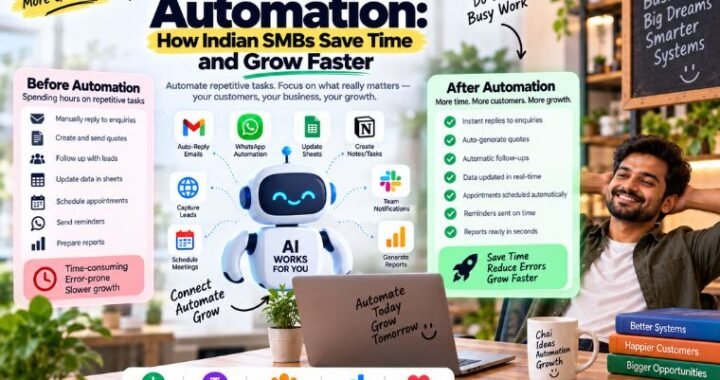
What Is AI Automation? The Complete Guide for Local Businesses

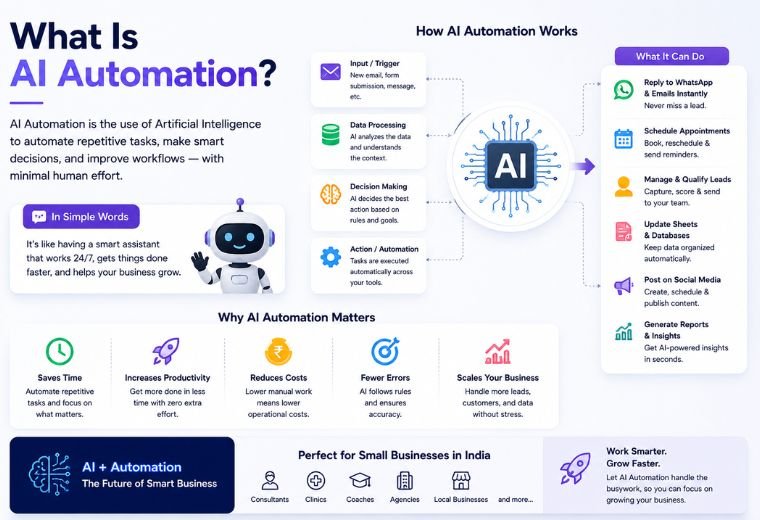
AI automation is the use of artificial intelligence — including machine learning, natural language processing, and smart workflows — to complete repetitive business tasks without human involvement. For local businesses, this means automatically answering customer messages on WhatsApp, taking bookings, sending follow-up reminders, collecting reviews, and managing billing — 24 hours a day, 7 days a week.
Table of Contents
You’ve probably noticed something frustrating about running a local business: a massive chunk of your day disappears into tasks that feel essential but never seem to end. Answering the same customer questions. Following up on leads. Sending booking reminders. Chasing reviews. Generating invoices.
None of that work grows your business. It just keeps it running.
AI automation changes that equation. Instead of you — or an employee — manually handling every repetitive interaction, an AI system does it for you. Instantly. Accurately. Without a break.
This guide covers AI automation from the ground up: what it is, how it works, what types of businesses benefit most, common mistakes to avoid, and exactly how to start. Whether you’re a first-time business owner or someone managing multiple locations, this is the most complete guide to AI automation you’ll find.
Let’s get into it.
What Is AI Automation? (The Clearest Definition You’ll Find)
AI automation is the process of using artificial intelligence to perform tasks that would otherwise require human time, judgment, and effort. Unlike basic automation — which follows rigid, pre-set rules — AI automation can understand context, learn from patterns, and make decisions on its own.
Think of it this way:
- Basic automation turns a light on at 6 PM every day, no matter what.
- AI automation turns the light on when it detects someone has come home — and adjusts based on behaviour over time.
In a business context, AI automation handles customer conversations, qualifies leads, books appointments, generates invoices, sends follow-ups, and manages reviews — all without you lifting a finger.
What Does AI Automation Include?
AI automation is an umbrella term. Under it, you’ll find:
| Type | What It Does | Example |
| Conversational AI | Understands and replies to natural language | WhatsApp chatbot that books appointments |
| Robotic Process Automation (RPA) | Automates rule-based digital tasks | Auto-generating GST invoices |
| Machine Learning | Learns from data to make predictions | Predicting which customers are likely to return |
| NLP (Natural Language Processing) | Reads and understands human text or speech | Understanding customer reviews and sentiment |
| Intelligent Workflow Automation | Triggers actions across multiple systems | Lead captured → WhatsApp alert → CRM entry |
A Brief History of Automation — and Where AI Changes Everything
Automation is not new. Factories have used machines to replace manual labor for over a century. But traditional automation was limited: it could only do exactly what it was programmed to do, with no flexibility.
The shift happened gradually:
- 1950s–1980s: Industrial automation (machines doing physical tasks)
- 1990s–2000s: Software automation (scripts, scheduled tasks, basic CRMs)
- 2010s: Rule-based chatbots and workflow tools (if-this-then-that logic)
- 2020–present: AI-driven automation (systems that understand context, adapt, and learn)
The key difference with modern AI automation? It handles ambiguity. A customer who types “kya aap kal open ho?” (Are you open tomorrow?) doesn’t need to follow a script. A well-trained AI understands the question — in Hindi or English — and responds accurately.
This is why AI automation is a fundamentally different tool than anything that came before it.
Why AI Automation Matters for Local Businesses in 2026
The Problem With Manual Operations
Most local business owners in India run lean operations. A restaurant owner manages orders, staff, and suppliers while also trying to respond to 50 WhatsApp messages a day. A salon owner books appointments between haircuts. A clinic receptionist handles patients, calls, and billing at the same time.
The result? Leads go cold. Bookings get missed. Customers don’t get timely responses. Reviews pile up without replies. Revenue leaks silently through the cracks.
What AI Automation Fixes
According to McKinsey’s 2024 automation research, approximately 60–70% of tasks in most business functions can be automated with current AI technology. For local businesses, this translates directly into:
- Faster response times (instant replies instead of hours)
- More bookings captured around the clock
- Higher Google ratings through automated review collection
- Less staff burnout from repetitive admin work
- More revenue from leads that don’t fall through the gaps
“Our WhatsApp is now automated and we never miss a lead. Sales increased by 40% in just 2 months.” — Rajesh Kumar, Kumar Furniture, Delhi (NayaLogic client)
How Does AI Automation Work?
AI automation works through a combination of technologies working together in sequence. Here’s a simplified breakdown:
Step 1: Input — The Customer Does Something
A customer sends a WhatsApp message, fills out a form, or searches on Google. This is the trigger that starts the automation.
Step 2: Understanding — The AI Reads and Interprets
Natural Language Processing (NLP) reads the message and identifies intent. “I want to book an appointment” means something different from “What are your prices?” The AI figures out which response is appropriate.
Step 3: Decision — The AI Chooses an Action
Based on the input and pre-configured rules or machine learning models, the system decides what to do: reply with a message, book a slot, escalate to a human, send an invoice, or trigger another workflow.
Step 4: Output — Something Happens Automatically
The customer gets a reply. A booking is confirmed. Your team gets a notification. A review request is sent. All of this happens in seconds, without human involvement.
Step 5: Learning — The System Gets Smarter
Over time, AI systems analyze patterns. Which messages get the best response? Which leads convert? The system uses this data to improve its responses and outcomes.
Key Benefits of AI Automation
Quick answer: AI automation saves time, cuts costs, captures more leads, and delivers faster, more consistent service — all without adding headcount. For a local business, that means more revenue from the customers you already have.
24/7 Availability
Your AI assistant never sleeps. A customer asking about your salon’s availability at midnight gets an instant response — and can even book a slot — without waking anyone up. That means no missed enquiries, no matter the hour.
Dramatically Faster Response Times
Speed wins customers. Research widely cited by Harvard Business Review found that replying to a lead within the first hour makes you far more likely to qualify that lead. AI automation makes near-instant replies the standard, not the exception.
Consistent Customer Experience
Humans have off days. AI doesn’t. Every customer gets the same clear, accurate, polite response — whether it’s the first enquiry of the morning or the fiftieth of the evening. Consistency builds trust, and trust brings repeat business.
Lower Operational Costs
Automating repetitive admin work reduces your need to hire extra staff just to answer messages or chase payments. For small businesses on tight budgets, this is one of the biggest wins. You spend on growth, not on busywork.
More Revenue from the Same Traffic
By capturing every lead, following up automatically, and cutting no-shows with reminders, AI automation pulls more revenue from the same number of visitors. You don’t need more foot traffic — you need to stop losing the traffic you already get.
Better Data and Insights
AI systems track every interaction. You learn which questions customers ask most, when they buy, and where they drop off. Those insights help you make smarter decisions about pricing, hours, and offers.
Expert Tip: Start by automating your single biggest time-drain first. For most local businesses, that’s replying to repetitive WhatsApp enquiries. Fix that one thing and you’ll free up hours every week.
Drawbacks and Limitations of AI Automation
Quick answer: AI automation is powerful, but it isn’t magic. It needs good setup, human oversight for complex cases, and clear boundaries. Knowing the limits helps you use it well.
Let’s be honest about where AI automation falls short. Understanding this upfront saves you frustration later.
- It struggles with truly complex or emotional situations. An angry customer with a unique complaint often needs a human touch. Good systems escalate these cases to a person.
- It needs quality setup. Poorly trained AI gives poor answers. The results depend on how well you configure it at the start.
- It can feel impersonal if overused. Automating everything, including moments that call for warmth, can annoy customers. Balance matters.
- It relies on data and connectivity. If your systems aren’t connected properly or your internet is down, automation pauses.
- There’s a learning curve. Your team needs a little time to trust the system and know when to step in.
Pros vs Cons at a Glance
| Pros | Cons |
| Works 24/7 without breaks | Struggles with complex, emotional cases |
| Instant, consistent replies | Needs careful initial setup |
| Lowers admin costs | Can feel impersonal if overdone |
| Captures every lead | Depends on data and connectivity |
| Scales without extra hiring | Short learning curve for staff |
Important Note: AI automation works best with your team, not instead of it. The goal is to free your people from repetitive work so they can focus on what humans do best — building real relationships.
Types of AI Automation (With Real Examples)
Quick answer: The main types of AI automation are conversational AI, robotic process automation, machine learning, natural language processing, and intelligent workflow automation. Most local businesses use a blend of these.
Each type solves a different problem. Here’s how they break down with real, everyday examples.
| Type | What It Does | Real Example for Local Business |
| Conversational AI | Understands and replies to natural language chats and calls | A WhatsApp chatbot that answers questions and books appointments |
| Robotic Process Automation (RPA) | Automates repetitive, rule-based digital tasks | Auto-generating GST invoices after each sale |
| Machine Learning (ML) | Learns from data to predict outcomes | Predicting which customers are likely to return this month |
| Natural Language Processing (NLP) | Reads and understands human text or speech | Reading customer reviews and flagging unhappy ones |
| Intelligent Workflow Automation | Links actions across multiple tools | New lead → instant WhatsApp reply → CRM entry → team alert |
| AI Marketing Automation | Runs targeted campaigns automatically | Sending a festive offer to past customers who haven’t visited in 60 days |
Most tools you’ll use combine several of these behind the scenes. A single WhatsApp automation, for example, uses conversational AI, NLP, and workflow automation together. If you want a ready starting point, browse the AI tools for local businesses that bundle these capabilities into simple setups.
AI Automation vs. Traditional Automation: What’s the Difference?
Quick answer: Traditional automation follows fixed rules and can’t adapt. AI automation understands context, handles messy real-world input, and improves over time. That flexibility is the game-changer.
Both save time, but they work very differently. Here’s a side-by-side comparison.
| Feature | Traditional Automation | AI Automation |
| How it decides | Fixed “if-this-then-that” rules | Understands context and intent |
| Handles unexpected input | No — breaks or ignores | Yes — interprets and adapts |
| Language understanding | Keyword matching only | Natural language, including Hindi + English mixes |
| Improves over time | No | Yes, learns from data |
| Best for | Simple, predictable tasks | Real conversations and complex workflows |
| Example | Auto-reply: “We are closed” | Understands “kya aap kal open ho?” and gives the real answer |
In short: traditional automation is a light switch on a timer. AI automation is a smart assistant that reads the room. For customer-facing work like messaging and bookings, that difference decides whether customers feel helped or ignored.
How Local Businesses Are Using AI Automation Right Now
Quick answer: Restaurants, salons, clinics, gyms, and real estate agents all use AI automation to answer messages instantly, fill their calendars, reduce no-shows, and collect more reviews — automatically.
Here are five real-world scenarios that show AI automation in action.
Restaurants: Never Miss an Order or Reservation
A busy restaurant gets dozens of WhatsApp messages during dinner rush. An AI assistant answers menu questions, takes reservations, shares the location, and confirms bookings — all while staff focus on serving food.
Mini case study: A mid-sized eatery set up automated WhatsApp replies for table bookings and takeaway orders. Missed enquiries during peak hours dropped sharply, and repeat orders grew because customers got instant confirmations. See how similar setups work for restaurants and food businesses.
Salons & Spas: Fill the Calendar Automatically
Salons live and die by their appointment book. AI automation lets customers book, reschedule, and get reminders without a single phone call. Reminders alone can slash no-shows.
Clinics & Doctors: Handle Bookings and Reminders Without a Receptionist Overload
Clinics juggle appointment requests, follow-up reminders, and repeat questions about timings and fees. An AI receptionist handles all of this, so front-desk staff can focus on patients in the room. Explore how this fits clinics and healthcare providers.
Gyms & Fitness Studios: Convert Enquiries Into Members
Someone messages a gym at 10 PM asking about membership prices. Instead of waiting until morning (and possibly signing up elsewhere), they get instant answers, a trial offer, and a booking link. That’s the difference between a lead lost and a member gained.
Real Estate: Qualify Leads While You Sleep
Property enquiries flood in at all hours. AI automation asks the right qualifying questions — budget, location, timeline — and passes hot leads straight to the agent’s phone. Agents spend time closing, not filtering.
If your business type sits somewhere in this list, the best WhatsApp AI automation service can map these exact workflows to your daily routine.
Step-by-Step: How to Implement AI Automation in Your Business
Quick answer: Start small, pick one high-impact task, choose the right tool, set it up, test it, then expand. You don’t need to automate everything on day one.
Follow these six steps to get AI automation working for you.
Step 1: Identify Your Biggest Time-Drain
List the repetitive tasks that eat your day. For most local businesses, it’s answering the same WhatsApp questions or chasing bookings. Pick the one costing you the most time or money.
Step 2: Set a Clear Goal
Decide what success looks like. “Reply to every enquiry within one minute” or “cut no-shows by half” gives you something measurable to aim for.
Step 3: Choose the Right Tool or Partner
You can use ready-made platforms or work with an agency that sets everything up for you. If tech isn’t your thing, partnering with the best digital marketing agency in Dehradun removes the guesswork entirely.
Step 4: Set Up and Train the System
Feed the AI your real info — services, prices, hours, common questions. The better the input, the smarter the responses. Add a clear rule for when to hand a conversation to a human.
Step 5: Test Before Going Live
Run test conversations. Ask tricky questions. Make sure the AI answers correctly and escalates properly. Fix gaps before real customers see it.
Step 6: Launch, Measure, and Improve
Go live, then watch the numbers. Track response times, bookings, and conversions. Review chat logs weekly and refine the answers. AI automation gets better the more you tune it.
Expert Tip: Don’t wait for “perfect.” Launch with one solid workflow, learn from real conversations, then expand into bookings, reminders, and reviews one step at a time.
Best Practices for AI Automation
Quick answer: Keep it human where it counts, train your AI well, always offer a way to reach a person, and review performance regularly.
- Lead with clarity. Tell customers they’re chatting with an assistant, and make it easy to reach a human.
- Train with real data. Use your actual FAQs, prices, and tone so replies sound like your business.
- Set smart escalation rules. Route complex or unhappy conversations to a person quickly.
- Keep the tone warm. Automation shouldn’t feel robotic. Match your brand’s friendly voice.
- Review weekly. Read chat logs, spot missed questions, and update answers.
- Protect customer data. Follow privacy best practices and use trusted, secure platforms.
- Start narrow, scale wide. Nail one workflow before adding more.
Common Mistakes Businesses Make with AI Automation
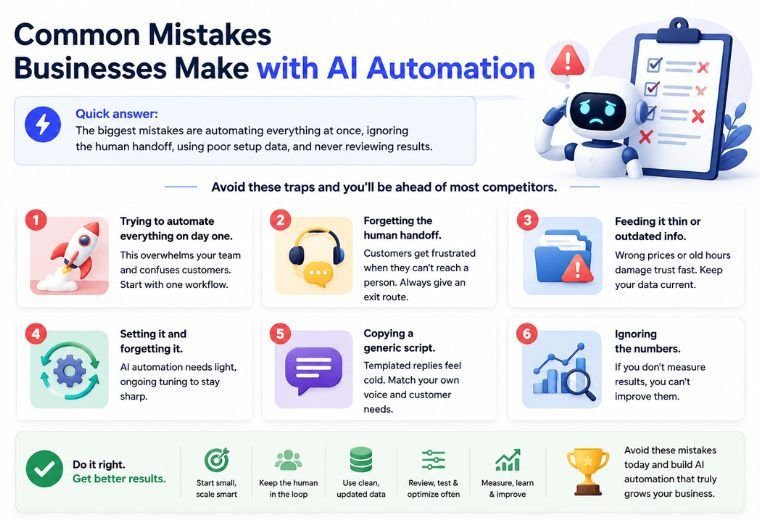
Quick answer: The biggest mistakes are automating everything at once, ignoring the human handoff, using poor setup data, and never reviewing results.
Avoid these traps and you’ll be ahead of most competitors.
- Trying to automate everything on day one. This overwhelms your team and confuses customers. Start with one workflow.
- Forgetting the human handoff. Customers get frustrated when they can’t reach a person. Always give an exit route.
- Feeding it thin or outdated info. Wrong prices or old hours damage trust fast. Keep your data current.
- Setting it and forgetting it. AI automation needs light, ongoing tuning to stay sharp.
- Copying a generic script. Templated replies feel cold. Match your own voice and customer needs.
- Ignoring the numbers. If you don’t measure results, you can’t improve them.
Important Note: A common mistake is judging AI automation by its first week. Give it a month of tuning. The gap between a rough setup and a well-trained system is enormous.
Expert Tips for Getting the Most Out of AI Automation
Quick answer: Automate follow-ups, use bilingual replies, combine tools into one workflow, and let AI handle reviews to boost your Google rating.
- Automate the follow-up, not just the first reply. Most sales are lost in the follow-up. Set up gentle automated nudges for leads who go quiet.
- Go bilingual. In India, customers mix Hindi and English freely. AI that understands both feels far more natural and converts better.
- Connect your tools. The magic happens when messaging, bookings, CRM, and billing talk to each other. One captured lead should flow through your whole system automatically.
- Automate review requests. Send a friendly review link right after a great experience. More reviews mean higher Google rankings and more walk-ins.
- Use quiet hours to your advantage. Late-night enquiries are pure profit when your AI captures them while competitors sleep.
AI Automation Decision Framework: Is It Right for You?
Quick answer: If you handle repetitive enquiries, miss leads after hours, or lose time on admin, AI automation will pay off. Use the checklist below to decide.
Score yourself. If you tick three or more, AI automation is likely a strong fit.
| Question | Yes / No |
| Do you get repetitive customer questions daily? | ☐ |
| Do you miss enquiries outside working hours? | ☐ |
| Do no-shows or missed follow-ups cost you money? | ☐ |
| Do you spend hours on bookings, reminders, or invoices? | ☐ |
| Do you want more Google reviews without asking manually? | ☐ |
| Are you losing leads to faster-responding competitors? | ☐ |
Three or more “Yes” answers? AI automation isn’t a nice-to-have for you — it’s a fast route to more revenue and fewer headaches.
Future Trends in AI Automation
Quick answer: Expect smarter voice assistants, deeper personalization, fully automated multi-channel journeys, and AI agents that handle entire tasks end to end.
AI automation is moving fast. Here’s what’s coming for local businesses.
- Voice-first automation. Customers will talk to AI assistants as easily as they type. Phone enquiries will get handled automatically.
- Hyper-personalization. AI will tailor offers to each customer based on their history, timing, and preferences.
- End-to-end AI agents. Instead of single tasks, AI will manage whole journeys — from first enquiry to booking to follow-up to review.
- Multi-channel unity. WhatsApp, Instagram, Google, and calls will feed into one smart system that remembers every customer.
- Cheaper, easier setup. What once needed a developer now takes a simple form. This trend will only accelerate.
The businesses that adopt early build a lead that’s hard to catch. Getting started now means you learn and improve while others are still deciding.
Summary Checklist
Use this quick checklist to put everything into action.
- ☐ Identify your single biggest repetitive task
- ☐ Set one clear, measurable goal
- ☐ Choose a tool or a partner to set it up
- ☐ Train the AI with your real prices, hours, and FAQs
- ☐ Add a clear human handoff rule
- ☐ Test with tricky questions before launch
- ☐ Launch one workflow first
- ☐ Automate follow-ups and review requests next
- ☐ Review chat logs weekly and refine
- ☐ Measure response times, bookings, and conversions
Summary Box: AI automation uses artificial intelligence to handle repetitive business tasks — replies, bookings, reminders, reviews, and billing — automatically and around the clock. For local businesses, it means faster service, more captured leads, and more revenue without extra staff. Start with one high-impact workflow, train it well, and grow from there.
Frequently Asked Questions
Is AI automation only for big companies?
No. AI automation is now affordable and simple enough for the smallest local shops. In fact, small businesses often see faster results because they automate their biggest pain point right away.
Will AI automation replace my staff?
No. It replaces repetitive tasks, not people. Your team stops doing busywork and spends more time on customers, sales, and service — the things humans do best.
How much does AI automation cost for a small business?
Costs vary by the tools and workflows you choose, but many local businesses start with an affordable monthly plan far cheaper than hiring extra staff. The revenue from captured leads usually covers the cost quickly.
Do I need technical skills to use AI automation?
Not anymore. Many tools are no-code, and agencies can set everything up for you. If you can use WhatsApp, you can use a well-built AI automation system.
Can AI automation understand Hindi and mixed languages?
Yes. Modern AI handles Hindi, English, and the mix of both that Indian customers use daily. This makes replies feel natural and boosts conversions.
How long does it take to set up AI automation?
A single workflow, like automated WhatsApp replies, can go live within days. More complex, connected setups take a bit longer, but you can start seeing value quickly.
Is AI automation safe for customer data?
It is when you use trusted, secure platforms and follow privacy best practices. Always choose providers that handle data responsibly and stay compliant.
What’s the easiest way for a local business to start?
Start with automated replies to your most common customer questions on WhatsApp. It’s the fastest win and frees up the most time immediately.
Can AI automation help me get more Google reviews?
Yes. It can send a friendly review request right after a positive experience. More reviews improve your local ranking and bring in more customers.
What if the AI gives a wrong answer?
Good systems include a human handoff. If the AI is unsure or the question is complex, it routes the customer to you or your team, so nothing slips through.
Does AI automation work outside business hours?
Yes, that’s one of its biggest strengths. It answers questions, books appointments, and captures leads 24/7, so you never lose a late-night enquiry.
How is AI automation different from a basic chatbot?
A basic chatbot follows fixed scripts and breaks easily. AI automation understands context, adapts to real conversations, and improves over time.
Which local businesses benefit most from AI automation?
Any business with repetitive enquiries and appointments — restaurants, salons, clinics, gyms, and real estate agents — see quick, clear results.
Can I automate my whole marketing with AI?
You can automate large parts of it: follow-ups, campaigns, review collection, and lead nurturing. Partnering with a specialist helps you connect it all smoothly.
How do I know if AI automation is working?
Track response times, number of bookings, no-show rates, and conversions before and after. The numbers tell you exactly what’s improving.
Ready to Put AI Automation to Work?
You’ve seen what AI automation can do: instant replies, more bookings, fewer missed leads, and more reviews — all running quietly in the background while you focus on customers.
The best next step is simple. See it working for your business, with your services, prices, and customers. Book a free demo with NayaLogic and watch your WhatsApp, bookings, and reviews get automated in real time.
👉 Book your free demo today — no tech skills needed, no pressure. Just a clear look at how much time and revenue AI automation can win back for you.