On-Page SEO: The Simple Guide for Indian Small Businesses

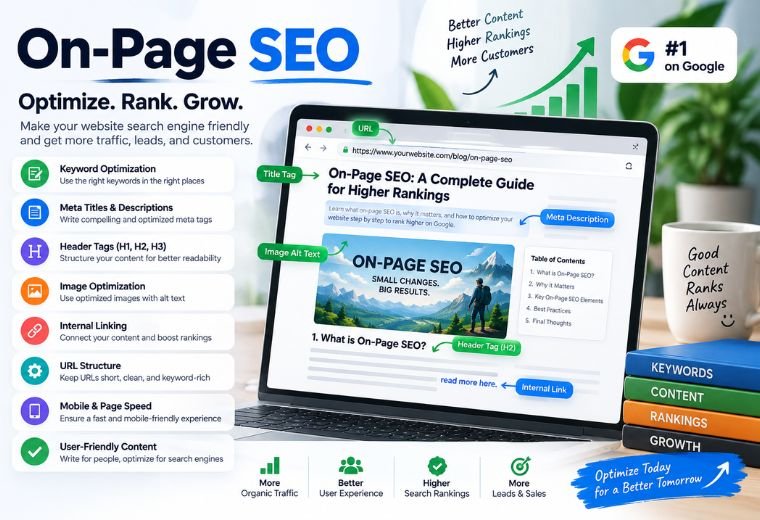
Quick Answer: On-page SEO means making changes to your own website so Google understands what your business offers — and shows it to the right customers. This guide covers every key on-page SEO element in plain language, with real examples from Indian businesses like kirana stores, salons, clinics, and restaurants.
Most Indian small business owners know they need to show up on Google. But when someone searches “best salon in Pune” or “dermatologist near me in Delhi,” only a handful of results appear on the first page. The rest? Invisible.
The difference between visible and invisible often comes down to on-page SEO. Not paid ads. Not a massive marketing budget. Just the right words, in the right places, on your own website.
This article explains on-page SEO in simple terms — what it is, why it matters, and exactly what to change on your website. No technical degree required.
By the end, you will know how to write title tags, meta descriptions, headings, and content that Google rewards with higher rankings. You will also find free tools to make the job faster.
What Is On-Page SEO, and Why Does It Matter for Indian Small Businesses?
On-page SEO (also called on-site SEO) is the process of editing the content and code on your own website to help Google understand your pages — and rank them higher in search results.
Think of it this way. Google is like a new customer walking into your shop for the first time. If your shop has no sign, no product labels, and no price list, that customer gets confused and leaves. On-page SEO is like adding a clear sign, organized shelves, and labeled products. Google can read your site quickly, understand what you sell, and recommend you to people searching for it.
For a kirana store in Jaipur, a dental clinic in Hyderabad, or a real estate agent in Mumbai, this matters enormously. Local customers search on Google every day. On-page SEO puts your business in front of them — for free, every single day, without paying for ads.
On-page SEO works alongside NayaLogic’s full SEO service, but many of the basics are things you can start fixing today.
On-Page SEO vs. Off-Page SEO: What Is the Difference?
Before diving into the steps, it helps to understand the two main types of SEO.
| Type | What It Covers | Who Controls It |
| On-Page SEO | Title tags, headings, content, images, internal links | You (on your own website) |
| Off-Page SEO | Backlinks from other websites, Google reviews, social signals | Other people and platforms |
This guide focuses entirely on on-page SEO — the part you control directly.
The 8 On-Page SEO Elements Every Indian Business Website Needs
1. Title Tags — The First Thing Google and Customers See
A title tag is the clickable blue headline that appears in Google search results. Every page on your website has one.
Why it matters: Google reads your title tag to understand what the page is about. Customers read it to decide whether to click.
What a good title tag looks like:
- For a salon in Bengaluru: “Hair Salon in Bengaluru — Haircut, Colour & Bridal | [Salon Name]”
- For a clinic in Noida: “Best Skin Clinic in Noida — Dermatologist Appointments | [Clinic Name]”
Rules to follow:
- Keep it under 60 characters
- Put your most important keyword near the front
- Include your city name for local searches
- Add your business name at the end
Use NayaLogic’s free Meta Title Generator to write title tags quickly without guessing.
2. Meta Descriptions — Turn Google Clicks Into Website Visits
A meta description is the short paragraph of text that appears below the title tag in search results. Google does not use it as a direct ranking factor, but it directly affects how many people click your link.
A well-written meta description tells the customer exactly what they will find — and why they should choose you over the other results.
Example for a restaurant in Chennai:
“Craving authentic Chettinad food in Chennai? Visit [Restaurant Name] on Anna Salai. Book a table online or order on Swiggy. Fresh ingredients, traditional recipes.”
Keep it under 155 characters. Include your keyword. End with a clear action — “Book now,” “Call today,” “Get directions.”
NayaLogic’s free Meta Description Generator can draft this for you in seconds.
3. Headings (H1, H2, H3) — Give Your Page a Clear Structure
Headings organize your content the way chapter titles organize a book. Google uses them to understand what each section of your page covers.
Every page should have:
- One H1 heading — the main topic of the page (e.g., “Best Property Agent in Gurgaon”)
- Multiple H2 headings — major sections (e.g., “Flats for Sale in Gurgaon,” “Why Choose Us”)
- H3 headings — subsections under each H2
Common mistake: Many small business websites have no headings at all — just one long block of text. Google struggles to read this. Break your content into clear sections with descriptive headings.
4. Keywords — Use the Words Your Customers Actually Search
Keywords are the words and phrases people type into Google when they are looking for something. On-page SEO means using those exact words naturally in your content.
A real estate agent in Mumbai should not just write “we sell homes.” Customers search “2BHK flat for sale in Andheri West” or “property agent in Bandra.” Use those phrases.
Where to place keywords on your page:
- In the title tag
- In the first paragraph of your content
- In at least one H2 heading
- Naturally throughout the page content
- In image alt text (explained below)
Avoid stuffing the same keyword into every sentence. Write for your customer first. Google rewards natural, helpful content.
To find related keywords your customers are searching, use NayaLogic’s free LSI Keyword Generator. LSI stands for Latent Semantic Indexing — it finds words and phrases related to your main keyword, so your content covers a topic fully.
5. Content Quality — Give Customers a Reason to Stay
Google’s job is to give searchers the most helpful answer. Pages that answer questions clearly and thoroughly tend to rank higher.
For an Indian small business, this means:
- Be specific. A dental clinic page should list the exact treatments offered, prices (if possible), and the qualifications of the dentist — not just “we offer dental services.”
- Write enough. A page with only 150 words often ranks below a page that covers the same topic in 500+ words.
- Update regularly. A restaurant that updates its menu page seasonally gives Google a reason to re-crawl and re-rank the page.
You do not need to write like a journalist. Write the way you would explain your business to a customer who just walked in.
6. Image Optimisation — Every Photo Is a Ranking Opportunity
Most business websites have photos — of the shop, the menu, the team, the products. Most owners upload them without any optimisation.
Three things to fix for every image:
- File name: Before uploading, rename the file. Instead of IMG_4823.jpg, use hair-salon-bengaluru.jpg.
- Alt text: This is a short description of the image added in your website builder. Google cannot see photos — it reads alt text to understand them. Write “hair colour service at [Salon Name] in Bengaluru” not “image1.”
- File size: Large image files slow your website down. Compress photos before uploading using a free tool like TinyPNG. A faster website ranks better.
7. Internal Links — Connect Your Pages, Keep Customers Exploring
An internal link is a clickable link that goes from one page on your website to another page on the same website.
Why this matters: Internal links help Google discover all your pages. They also keep customers on your site longer — which is a positive signal to Google.
Example: A salon website might link from its homepage to a specific page about “Bridal Makeup Packages in Pune.” A clinic website might link from a general “Our Services” page to a detailed “Knee Replacement Surgery” page.
Aim to add 2–4 internal links per page. Use descriptive anchor text — the clickable words should tell the reader (and Google) what the linked page is about. “Click here” tells Google nothing. “See our bridal makeup packages” is far better.
8. Schema Markup — Help Google Display Rich Information
Schema markup is a small piece of code added to your website that gives Google extra information about your business. It sounds technical, but the result is practical: your search result can show star ratings, opening hours, price ranges, and FAQs directly in Google — before anyone even clicks your link.
For a clinic in Hyderabad, schema markup might display your opening hours and a 4.8-star rating right in the search result. That builds trust instantly.
Use NayaLogic’s free Schema Generator to create the right schema code for your business type without needing a developer.
On-Page SEO Checklist for Indian Small Businesses
Use this checklist every time you create or update a page on your website.
| Task | Done? |
| Title tag written (under 60 characters, includes keyword + city) | ☐ |
| Meta description written (under 155 characters, includes keyword) | ☐ |
| One H1 heading on the page | ☐ |
| H2 and H3 headings used to organize content | ☐ |
| Primary keyword used in the first paragraph | ☐ |
| Related keywords added naturally throughout content | ☐ |
| All images have descriptive file names and alt text | ☐ |
| Images compressed for fast loading | ☐ |
| 2–4 internal links added to related pages | ☐ |
| Schema markup added for business type | ☐ |
| Content answers the customer’s real question clearly | ☐ |
| Page reviewed on mobile (looks good on a phone screen) | ☐ |
How Long Does On-Page SEO Take to Show Results?
On-page SEO is not instant. Google needs time to re-crawl your website and re-assess your pages after changes are made. For most small business websites, you can expect to see movement in rankings within 4 to 12 weeks of making consistent improvements.
The more competitive your local market, the longer it takes. A salon in a small town may see results faster than a restaurant in South Mumbai. Patience is part of the process.
On-page SEO builds a foundation. Every improvement you make stays on your site permanently and compounds over time — unlike paid ads, which stop the moment you stop paying.
Combine On-Page SEO With a Strong Local Strategy
On-page SEO works best when combined with a well-optimised Google Business Profile. That is the listing that appears in Google Maps and the “near me” results — the most valuable search real estate for any local Indian business.
For businesses in specific industries, NayaLogic has tailored guides covering how SEO applies to your exact type of business — whether you run a clinic, a restaurant, a salon, or work in real estate.
Start Ranking — Free Demo Available
On-page SEO is one of the highest-ROI activities a small business can do. No ad spend. No ongoing fees. Just the right words in the right places on a website you already own.
Start with the checklist above. Use the free tools linked throughout this guide. Fix your title tags and meta descriptions first — those two changes alone can improve your click-through rate within weeks.
If you want a full SEO audit and a clear action plan for your business, book a free demo with NayaLogic. NayaLogic’s SEO service starts at ₹2,999/month with no setup fee — built specifically for Indian small businesses that want real results without the complexity.
Frequently Asked Questions
What is on-page SEO in simple terms?
On-page SEO means making changes to your own website — like editing titles, headings, and content — so Google understands what your business offers and shows it to the right customers in search results. You control all of it directly.
How is on-page SEO different from off-page SEO?
On-page SEO covers everything on your website: title tags, content, images, internal links. Off-page SEO covers things that happen outside your website, like other websites linking to you or customers leaving Google reviews. You control on-page SEO; off-page SEO depends partly on others.
Do I need a developer to do on-page SEO?
Not for most tasks. Editing your title tag, meta description, headings, and content can be done through website builders like WordPress, Wix, or Shopify without writing code. Schema markup is the one area where a tool or developer may help — use NayaLogic’s free Schema Generator to simplify it.
How many keywords should I use on one page?
Focus on one primary keyword per page — the main thing you want that page to rank for. Then add 4–8 related keywords naturally throughout the content. Use NayaLogic’s LSI Keyword Generator to find strong related keywords.
How long does on-page SEO take to work?
Most businesses see ranking improvements within 4 to 12 weeks of making on-page SEO changes. Results depend on how competitive your local market is and how well your overall website is optimised.
Is on-page SEO free?
The work itself is free — you are editing your own website. Free tools like NayaLogic’s Meta Title Generator, Meta Description Generator, and Schema Generator make the process faster. If you want a professional to handle it, NayaLogic’s SEO service starts at ₹2,999/month.
Does on-page SEO work for local businesses in India?
Yes. On-page SEO is one of the most effective ways for local Indian businesses — kirana stores, clinics, salons, restaurants, real estate agents — to rank on Google without spending money on ads. Adding your city name to title tags and headings alone can improve your local search visibility significantly.